Tidying Up Academic Hub's Plumbing

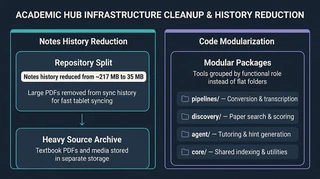 Illustration: A smaller notes history and code organized by function.
Two recent changes to Academic Hub were about making the everyday work easier: keeping notes in sync and finding my way around the software.
I separated large reference files from the handwritten notes that need to sync between devices. Before that, PDFs had slipped into the notes’ saved history, so downloading the notes also brought along old copies of large files. Removing them from that history shrank the notes repository from about 217 MB to 35 MB in the September cleanup. The source documents moved to a separate archive, leaving the tablet to sync the working notes and drawings.
Moving the files also meant preserving their connection to searchable transcripts. The search catalog uses a fingerprint of each source file’s contents, so a renamed or moved PDF can retain its identity. Its recorded location still needs updating, but it does not have to become a new document just because its folder changed.
I also grouped the software tools by what they do: converting documents, finding papers, helping with study, or providing functions the other tools share. That gives me a clearer place to look when I need to change something.
The reorganization was intended to preserve how the tools work. The full automated test suite passed after the move. The Obsidian sync page describes the sync setup, and the Academic Hub overview shows how the tools fit together.
