Converting Academic Resources to Markdown

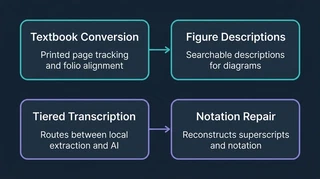 Illustration: Textbook conversion and note transcription preserve information for search.
The Academic Hub conversion tools turn books and class documents into text that can be searched alongside my notes. Textbooks and handwritten or mixed-format documents need different approaches, so the project now has a tool for each.
For textbooks, the converter now uses chapter boundaries where possible and records printed page numbers as well as PDF pages. In a four-book check, it avoided duplicate section markers and recovered printed page numbers on 96–98% of pages. A separate pass added descriptions to 764 of 793 candidate figures across five books, skipping the ones judged decorative.
Those page references help me compare a passage with the original textbook, even when the PDF’s page count differs from the numbers printed on the pages. Figure descriptions also make some of the information in diagrams available as searchable text. Both are useful when I need to return to a source and check what it actually says.
Shorter documents such as exams and handwritten notes need a different path. The Notes Transcription Pipeline checks whether ordinary text extraction is sufficient and uses AI to transcribe the harder pages. The work also uncovered problems that a plain text dump can hide: dropped spaces, lost superscripts, and a square-root symbol read as the letter p.
Some notation could be recovered by looking at the page layout more closely. The extractor uses character size and vertical position to reconstruct superscripts and subscripts. That lets it recover some mathematical structure locally before paying for AI transcription.
Update, October 15, 2026: A later Notes Post-Processing run repaired that particular square-root error after comparing it with the source page image. That closes the specific example; other extracted text still needs review.
The textbook conversion page records the checks behind these results, their limits, and the ongoing work.
