Why I Use Obsidian and Excalidraw for Academic Notes

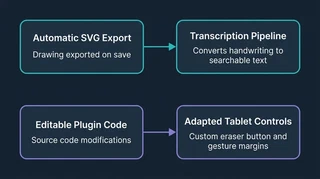 Illustration: Automatic SVG export supports transcription, while editable plugins adapt tablet controls.
I take many of my academic notes by hand. Diagrams, equations, and quick annotations are often easier to draw than type, but handwritten pages are hard to search and connect to related material later.
I use Obsidian, a notes app, with Excalidraw, a drawing tool that lets me write and sketch inside it. Saving a note automatically creates an SVG image of the drawing. My Notes Transcription Pipeline reads those images and turns the handwriting into text that can be searched alongside my other course materials.
OneNote and GoodNotes made writing feel natural, but their file-type limits got in the way of my processing workflow. This setup keeps my handwritten work alongside lecture slides, textbooks, and other course materials, with links between related notes.
Customization was another major reason to choose this setup. I can edit the source code for Obsidian plugins, which let me add an eraser button and translate a pen-tool menu. When the tablet’s gesture bar covered the zoom and undo controls, I changed the interface styles to move them within reach. Being able to fix those details myself was an advantage over my experience with OneNote.
I keep large reference files out of the notes sync so the tablet only needs to download the working notes and drawings. Some plugin settings and customizations still need to be copied or enabled by hand.
A lecture can leave me with two versions of a drawing: the notes I wrote in class, and a later copy with the lecture slides pasted beside them. Once transcribed, the search tools can recognize some of those pairs and avoid showing both copies when the more complete version is available. Both originals remain editable.
Matching whole notes by subject matter proved too broad: separate lectures on similar topics could look like duplicate versions. Comparing short sequences of words in the handwritten portions gave a cleaner distinction in the tested microeconomics notes. The useful signal was whether the same writing appeared in both versions.
That connection is what makes the setup useful to me. I can keep writing by hand while making the notes easier to find and revisit later. The transcription tools make the saved drawings searchable, and the sync setup occasionally needs attention.
Updated October 15, 2026, to include the related-note matching added after this post was first written.
For the sync setup, transcription steps, and current matching limits, see the Obsidian and Git Sync, Notes Transcription, and Source Indexer project pages.
