Managing this site with HugoBlox and Claude

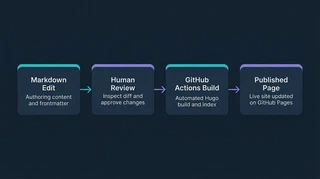 Illustration: Markdown editing, human review, a GitHub Actions build, and publication.
Each page on this site starts as a text file. Hugo turns those files into web pages, and HugoBlox supplies the “Academic CV” template for their appearance. I write in Markdown, a simple format for marking headings, links, and other formatting within the text.
Lately I’ve been doing much of the editing with Claude Code, a coding assistant that works directly with the site’s files. It can add a project page, change the navigation, or adjust a layout. I can inspect the exact changes before accepting them.
The template arrives through Hugo modules, reusable packages loaded when the site builds. Small local additions, such as support for GitHub buttons, can extend it without copying the whole theme into this repository. That gives the assistant a useful boundary: the site’s content and customizations live here, while the shared template stays in its own packages.
Recent edits included bringing the main sections together on one scrolling homepage and adding pages for Marker PDF Conversion and RAG Analysis, two tools in Academic Hub. I also left the template’s unused example pages unpublished, so they are available if I want to return to them.
When I’m ready to publish, I send the reviewed changes to GitHub, where the site’s source files are stored. An automated workflow rebuilds the pages and updates the public site. The saved history lets me see what changed and revisit an earlier version if needed.
That suits how I want to maintain a personal site: edit the content, review it, and let the template and publishing tools handle most of the web-development work.
