Academic Hub
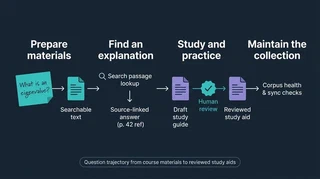 Illustration: Follow a question from course material to a reviewed study aid.
As a PhD student, a common problem is having too many learning resources and not enough time to explore them all. Synthesizing information from textbooks, lecture slides, recitation notes, past exams, and external content and distilling the most important lessons is a massive challenge, especially for multiple overlapping courses. A question I jotted down during lecture in my handwritten notes may require leafing through a textbook index, cross-checking against the notation used by my specific faculty, and connecting back to an example from a past semester’s problem set. Online searches or generic AI responses are faster, but lack the specific context from my own materials; usually LLM responses are based on other disciplines or invoke concepts far out of scope for my course.
My solution is the Academic Hub: a complete system for organizing my notes and course materials in a machine-readable format that a locally based AI agent can use to serve as my personal librarian and tutor. An interconnected group of customizable coding pipelines take my disorganized notes, slides, and syllabi and turns them into a fully searchable corpus of data, complete with metadata tags, which a local or low-cost AI model can use to generate customized study guides, practice problems, and Socratic tutor agents. The entire system is built to be reproducible for any course and any type of input: handwritten notes, slides, scans of textbooks, typeset PDFs–just drop a collection of study materials into a course directory, use a local agent to run the conversion and tagging pipelines, then start building custom materials from the resulting knowledge corpus. The system is also built to prioritize free or low-cost methods for transcribing content, relying on local LLMs or subscription models where possible and falling back to APIs if necessary, to ensure complete customizable to the user’s cost sensitivity and preferred LLM environment.
The common foundation for every course is a collection of materials transcribed into a machine-readable format, typically markdown or JSON databases. Converting notes or slides preserves the text, mathematical notation, and page context; the Source Indexer makes that material searchable by a local agent or using backlinks in a notes aggregator like Obsidian. From there I can ask a question, develop custom study guides, or explore how course concepts depend on one another through interactive concept maps. Creating this as a customized local pipeline rather than relying on a commercial study system or a cloud-based retrieval-augmented generation approach like Gemini’s Notebooks gives me complete flexibility to create and modify my own study tools, without worrying about releasing potentially copyrighted material to a third-party.
Prepare the materials
- Textbook conversion preserves equations, figure descriptions, and page references; notes transcription handles shorter documents and handwriting.
- Post-processing flags suspicious extracted text and compares it with source images before changing it.
- Video Lecture Notes turns lecture recordings into study notes. Reliable references from each concept back to its exact moment in a video remain unfinished.
Find an explanation
RAG Analysis uses retrieved passages to answer a question with references I can open and check. I can save an answer or a session recap as a study note; Summary Enhancement can return to its recorded passages to develop the explanation further.
Concept Graph uses the shared source material to map relationships between ideas, including the assumptions that make a conclusion follow. Its first full graph covers part of a microeconomics course. A graph helps trace those dependencies; a guide explains a topic in sequence. Both contain drafted material that needs review.
Study and practice
- Study Guide Pipeline starts from a topic list, selects indexed sources, drafts a guide, and proposes edits for review. Its optional enhancement step adds the same fuller explanations and worked examples available to an existing summary.
- Tutor Diagnosis gives hints and feedback on an attempt. The separate Socratic Tutor tracks progress during a conversation, but its strict checks have struggled with teaching unfamiliar material.
- Guided Solutions keeps my reasoning, agent derivations, and tutoring work distinct for comparison.
- Problem Corpus stores extracted exercises with their provenance. Problem Generation currently retrieves its own style examples; integration with that stored bank remains separate work.
- Visualizations can accompany an explanation, while Audio Generator turns notes into spoken episodes. A generated chart or recording still needs checking for its intended use.
Maintain the collection
Obsidian Git Sync keeps working notes available across devices. Corpus Health reports missing or stale outputs for review, and Project Steering helps prioritize the next work.
The subproject collection links to each tool’s current evidence and limits. A useful study session still involves choosing the material, checking coverage, and comparing generated explanations with their sources. The shared source trail makes those checks possible; it does not settle whether an explanation is correct.
