Obsidian Git Sync
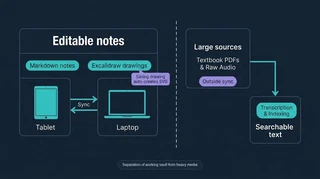 Illustration: Sync the working notes while keeping large sources separate.
I want to write a lecture note on my tablet and find the editable drawing on my laptop, without bringing the whole textbook archive onto the tablet. This setup uses Obsidian, a notes app, and Excalidraw, its drawing tool. Working notes sync separately from the large source files used to process them.
The tablet currently uses Fit, which exchanges files through GitHub’s API rather than maintaining a local Git history. That avoids the history-download problem that caused trouble with an earlier plugin. The laptop uses Obsidian Git, and some settings remain device-specific.
| Lightweight notes vault | Separate source archive |
|---|---|
| Markdown notes, editable Excalidraw scenes, processed text | PDFs, exported drawing images, and generated audio |
Saving an Excalidraw file automatically creates an SVG image. The transcription tools use those images to make the handwriting searchable; saving alone does not perform that transcription. The source-relocation record reports the existing course materials moved into the archive, with the tools adapted to find them there while keeping processed text in the notes vault.
Keeping the boundary intact required more than a folder move. An earlier sync plugin rewrote ignore rules from each device’s settings, letting PDFs enter the notes history. Removing those large files from the old history reduced its size from about 217 MB to 35 MB. That incident explains the emphasis on separate storage and device settings; the current tablet sync uses a different mechanism.
Customization was another reason I chose this approach. Editing plugin code let me translate a pen menu and add an eraser button. A separate interface-style change moved zoom and undo controls clear of the tablet’s gesture bar. Being able to fix those details myself was an advantage over my experience with OneNote.
Fit does not transfer plugin source files, so changes to that customized plugin still need a manual copy to the tablet. The interface-style snippet can sync when explicitly included, but enabling it and other settings may need attention on each device.
Matching handwritten-only notes with later copies containing slides is handled by the Source Indexer. The sync follow-up and relocation record distinguish the configuration from the completed archive move.
