Source Indexer
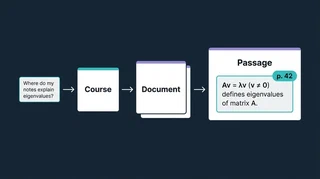 Illustration: find the document, then the passage worth reading.
A question about eigenvalues might belong with a textbook proof, a lecture explanation, or an exercise I have already attempted. Source Indexer searches converted course materials in two stages: first finding promising documents, then locating passages inside them. The result includes a heading, page, or paragraph reference so I can continue reading where the match came from.
The search catalog has a record for each document, much like a library card with a brief description and subject labels. These descriptions help find material; the longer summaries I study are written by the answering and guide tools. A record’s identity comes from the source file’s contents rather than its filename, so renaming a PDF does not have to create a new document. Course-level records narrow the search before it compares individual files.
Give other study tools something to read
The notes and textbook converters register their outputs with the indexer. Search uses document descriptions, subject labels, and numerical representations of meaning to rank related material, then returns excerpts from selected documents. PDF-derived passages can carry page references; Word-derived notes without page markers can use headings or numbered paragraphs instead.
Several study tools use that foundation:
- RAG Analysis retrieves passages for a question and records their references with the answer. Summary Enhancement can reopen the exact passages saved with a study summary to develop it further.
- Study Guide Pipeline selects indexed sources for a topic list, then drafts and revises a longer guide.
- Concept Graph retrieves evidence for explanations and connections, including the conditions a theorem needs.
The same search infrastructure supports papers and research notes, keeping their collection identities distinct from course materials. Each downstream tool still has to interpret the passages it receives.
Similar subjects are not always duplicate notes
A lecture may exist as handwriting alone and as a later version with slides pasted beside the same handwriting. Searching both can crowd out other useful sources. Whole-document similarity was too broad to distinguish these pairs from different lectures on the same subject. The subset linker instead compares short word sequences from the handwritten portions, then hides the smaller version when its fuller counterpart survives the search. Both remain accessible.
Links across different years of a course are another feature. The tool reuses existing document comparisons to identify related material, with uncertain matches held for review. That supports revisiting an older explanation without claiming every note has already been matched correctly.
An early August 2026 checkpoint recorded 30 healthy document cards in one course, with 14 subject labels. Those are historical catalog checks, not current totals or a measure of search accuracy. Dense proofs and narrative notes can still need different passage boundaries. Corpus Health can report missing or stale outputs, but its available repair is narrowly scoped rather than a general automatic cleanup. The README describes the catalog, search, and linking behavior.
